
Configure Modbus devices
Needs Edge Server 5.4.2 or later.
A Growbud Controller has one RS-485 port. As a Modbus master, the Controller polls the devices on that bus. It also switches the devices that have coils, for example a Waveshare Modbus RTU Relay board. The Controller keeps the configuration and runs it alone. The Edge Server stores the configuration, sends changes over LoRaWAN and publishes the point values.
This guide has two halves. The first half sets up a device in the Growbud app. The second half does the same through the Write API, then writes a point.
Before you start
- A Controller on your Edge Server, with firmware that reports its Modbus capabilities. The app shows the capabilities under Controller capacity.
- The device wired to the RS-485 terminals: A to A, B to B, and a common ground.
- The device's address, baud rate, parity and stop bits. Every device on one bus must use the same line format.
Set the address and line format before the device joins a shared bus. The Waveshare relay boards ship at address 1, 9600 baud, 8N1. Two boards at address 1 answer at the same time, and you cannot read either board. Set the address with the vendor tool on the bench. The Growbud profiles do not change the line format of the board. The vendor documents give two different encodings for that setting. A wrong value puts the board on a line format that no master uses.
How long a change takes
The Edge Server sends configuration changes and point writes to the Controller over LoRaWAN Class C. On the bench:
| Action | Time |
|---|---|
| Send an 800-byte configuration (19 frames of up to 53 bytes) | About 70 seconds |
| Write one point and get the confirmation | About 20 seconds |
The 53-byte frames need Controller firmware 5.4.2 or later.
Plan for these times.
In the Growbud app
The steps are the same in the web app and the desktop app.
1. Open the Controller
- Select Control in the sidebar.
- Select the Controller in the list.
- Open Controller settings.
- Select the Fieldbus tab.
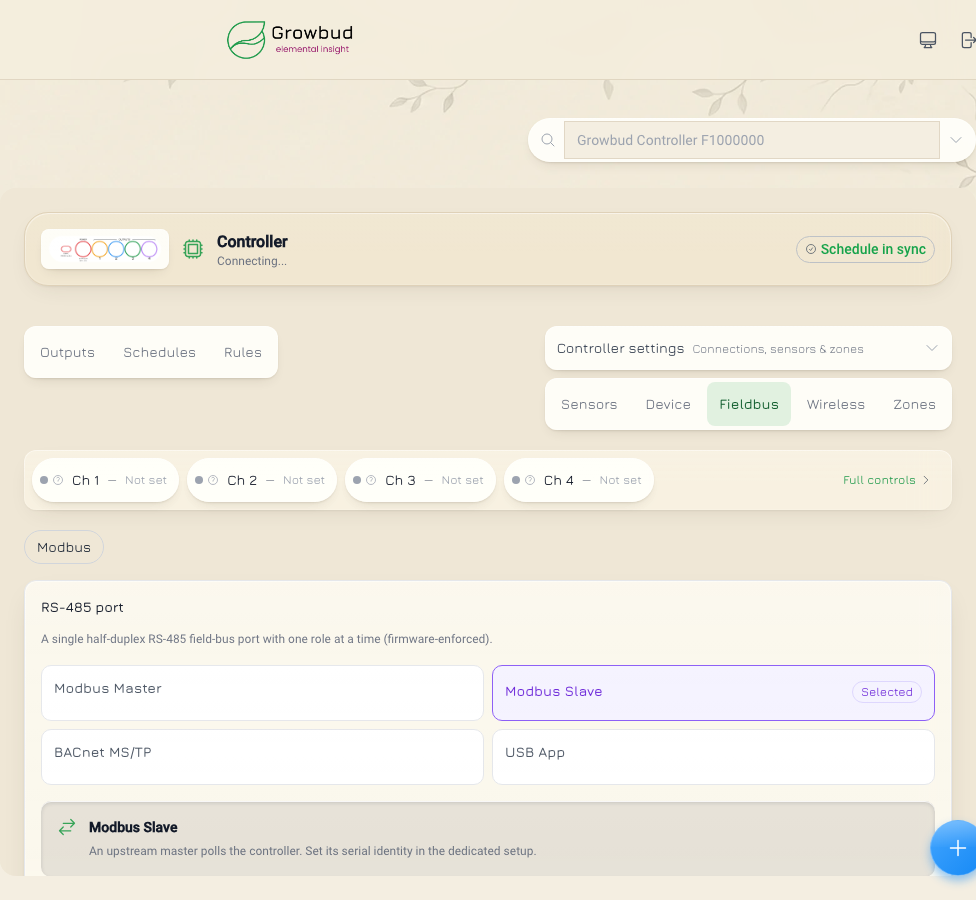
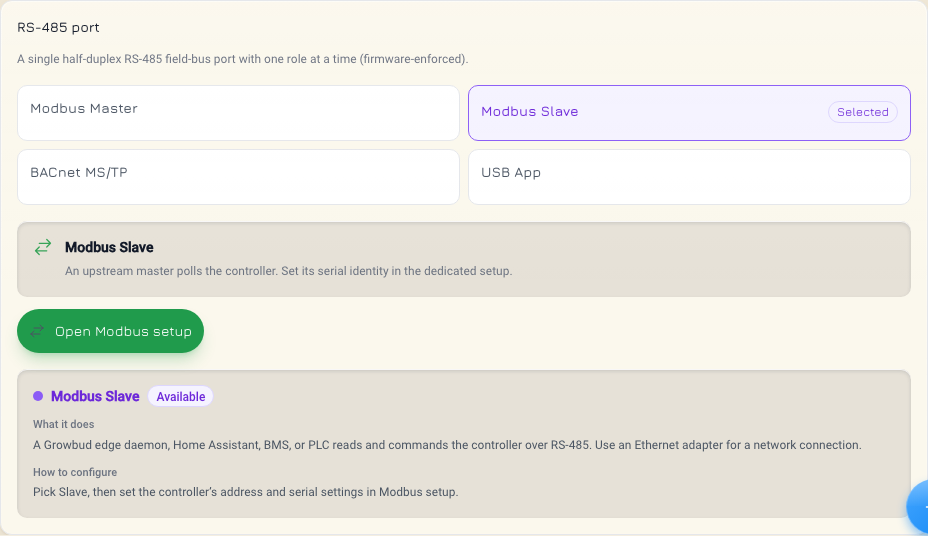
2. Set the port role
- Under RS-485 port, select Modbus Master.
- Select Open Modbus setup.
The port has one role at a time.
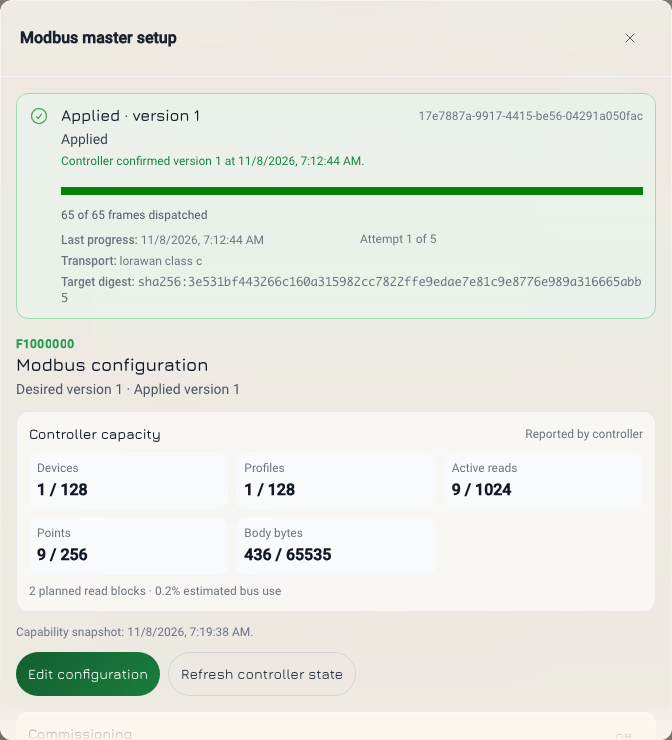
3. Read the status
The Modbus setup opens with the last operation at the top. Applied means that the Controller confirmed the configuration. Below it is Controller capacity. It shows how many devices, profiles, reads and points the Controller can hold. It also shows how much of that this configuration uses.
4. Edit the configuration
- Select Edit configuration. The draft stays in the app until you apply it.
- Set Controller role to Master / poll devices.
- Set the baud, parity and stop bits under RS-485 bus. They apply to every device on the bus.
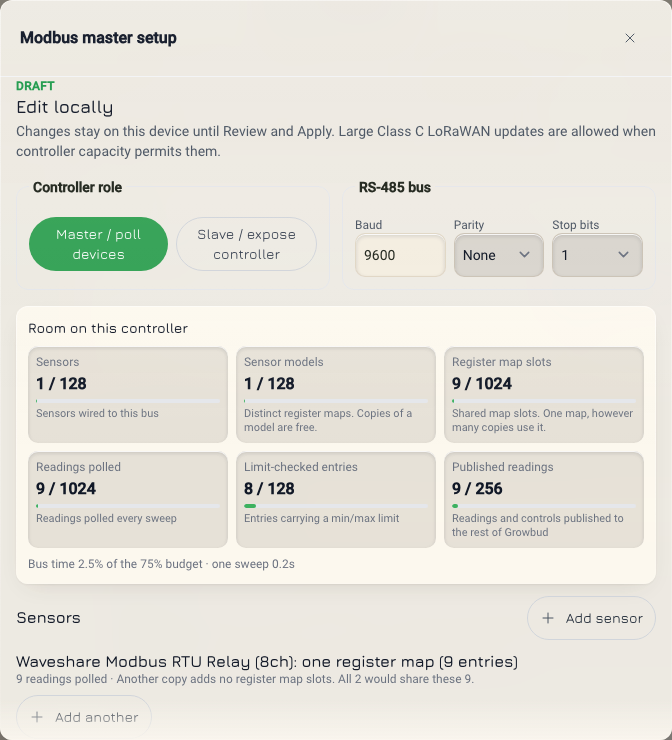
5. Add a device from the library
- Select Add sensor to add a device.
- Search the library, for example for
WaveshareorSenseCAP.
Each library card is a profile. A profile is the list of registers of one device model. An entry is one register in the profile. Each card shows the maker, the model, the category and the number of entries. A card marked Best-effort map comes from the common layout of a part, not from a vendor manual. Check its entries against the device.
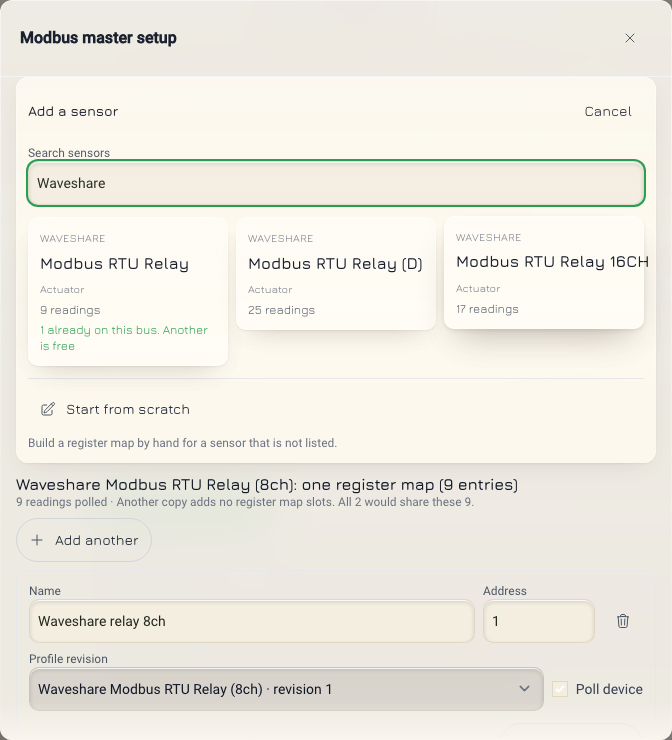
- Select the card.
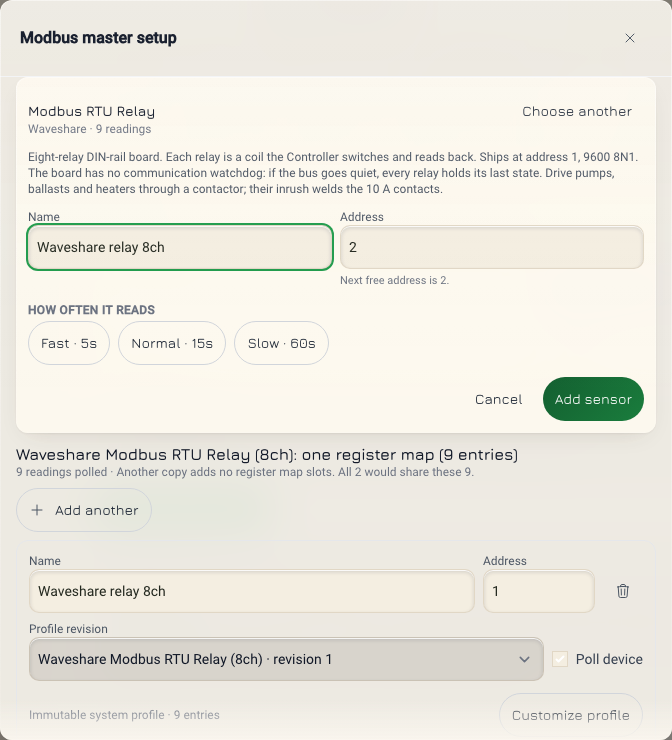
- Give the device a Name.
- Set its Address. The note under the address shows the next free address on the bus.
- Select how often the Controller reads the device.
- Select Add sensor to add the device to the draft.
6. Check the device card
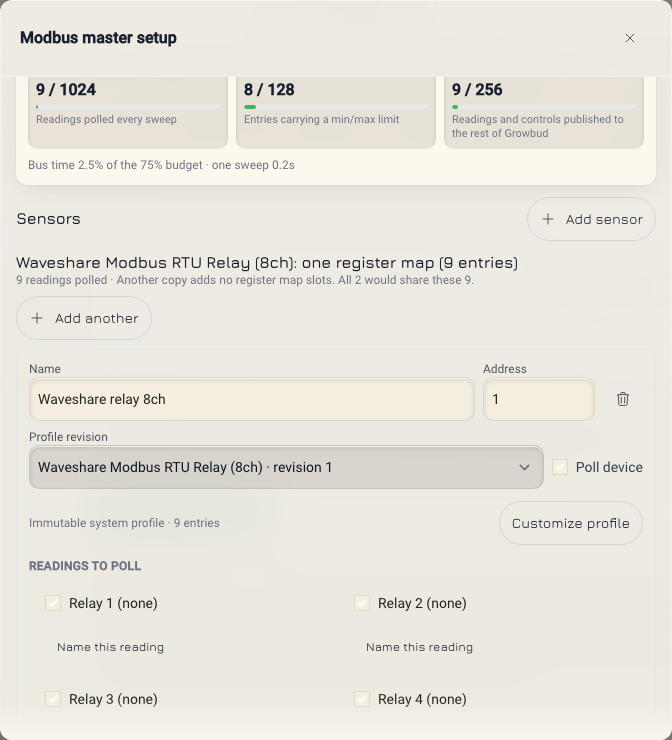
Each device in the draft has a card.
- Profile revision is the profile revision that the Controller will use.
- Poll device turns the reads on.
- Readings to poll sets the entries that the Controller reads. Each polled entry becomes a point.
7. Apply and watch the operation
- Select Review changes.
- Select Confirm and apply.
The Edge Server saves a new version and sends it to the Controller over LoRaWAN. The operation card at the top shows the frames sent, the attempt and the transport. Applied means that the Controller took the new version. An 800-byte configuration is 19 frames of up to 53 bytes and applies in about 70 seconds.
To stop an operation that the Controller has not taken yet, select Cancel queued update.
8. Read the points
Process points lists the points of the configuration that the Controller confirmed. Each point has a stable key, for example ws8.relay_1, and a stable ID. A Read / write or write point accepts a runtime write. A read point does not.
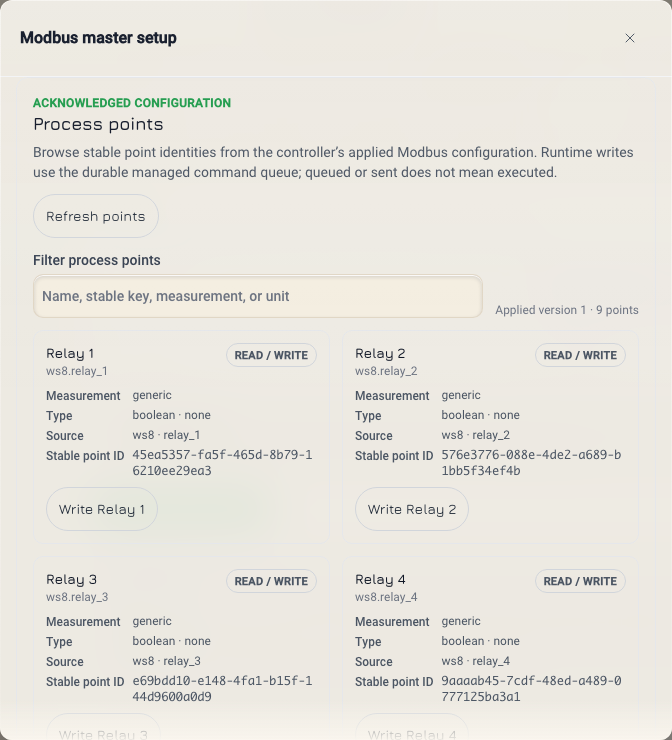
Audit trail lists the completed operations, with the delivery evidence and the outcome of each.
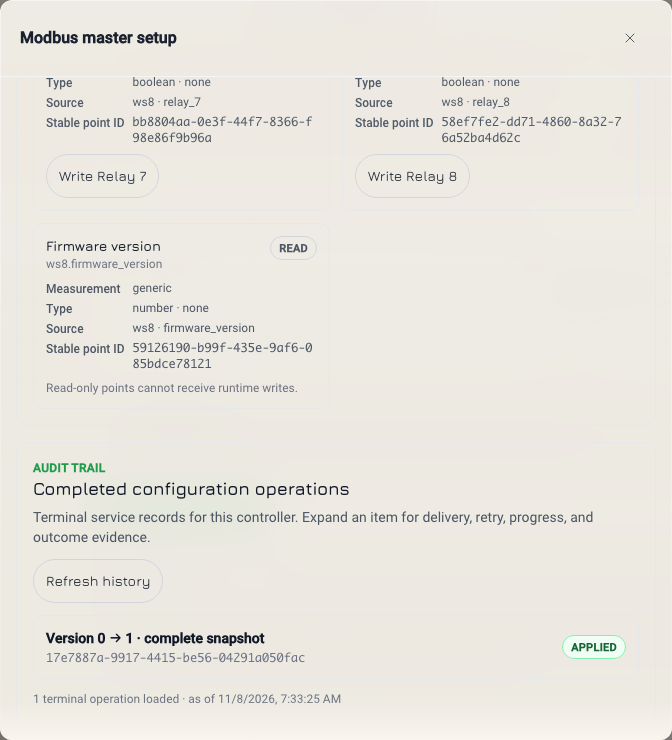
Through the Write API
Every Modbus read is a GET under /sensing/v1/ and accepts any Edge Server token. Every Modbus change is under /control/v1/, needs a token with the control scope, and writes an audit row. See Authentication.
| Call | Who can make it |
|---|---|
| Read the configuration, capabilities, profiles, operations and points | Any token of your organization |
| Validate, replace, change, deploy, cancel, add a profile | A control token of an organization admin |
| Write a point | Any control token of your organization |
A user who is not an organization admin gets 403 permission_denied from the Modbus change routes. A serial outside your organization gives 404.
Put your Controller serial in SERIAL and your Edge Server address in EDGE. The Edge Server uses a self-signed certificate, so the examples use curl -k. Trust the certificate to remove -k.
export TOKEN=<your control token>
export EDGE=https://<your Edge Server address>:8443
export SERIAL=<your Controller serial>
export CTRL=$EDGE/control/v1/controllers/$SERIAL
export SENSE=$EDGE/sensing/v1/controllers/$SERIAL
The steps follow this order: capabilities and profiles, configuration, validate, replace or change, follow the operation, then points and point write.
1. Read the capabilities and the profiles
curl -sk -H "Authorization: Bearer $TOKEN" "$SENSE/modbus/capabilities"
curl -sk -H "Authorization: Bearer $TOKEN" "$SENSE/modbus/profiles"
The capabilities answer is { "capabilities": { ... } }. It says what the Controller firmware can do. It lists the Modbus function codes, the value types and the register orders that the firmware reads. It also gives limits such as max_devices, max_profiles, max_entries_per_profile and max_operations_per_transaction. status is reported, model_default or unknown. It is unknown until the Controller has reported its capabilities.
The profiles answer is { "profiles": [ ... ] }. These are the profiles that your organization can use, the device library included. Without a query, the answer has the current revision of each profile. Add ?profile_id=<id> for one profile, and &revision=<n> for one revision of it.
Find the profile you need. Copy its profile_id and revision, for example for the Waveshare Modbus RTU Relay (8ch).
2. Read the configuration
curl -sk -H "Authorization: Bearer $TOKEN" "$SENSE/modbus/config"
{
  "config": {
    "device_id": "<serial>",
    "etag": "modbus:1:sha256:...",
    "desired_version": 1,
    "device_acked_version": 1,
    "sync_status": "in_sync",
    "config": { "mode": "master", "bus": { "...": "..." }, "devices": [] },
    "capacity": { "...": "..." },
    "last_operation": { "operation_id": "...", "status": "applied", "target_version": 1 }
  }
}
Keep etag and desired_version. Every change needs both. Read etag from the body; the API does not send an ETag header.
A Controller with no configuration answers with the empty default at desired_version 0, not with 404.
sync_status | Meaning |
|---|---|
in_sync | The Controller runs desired_version. |
draft | A saved version is not sent. |
queued | An operation waits to send. |
deploying | The Edge Server sends the version. |
awaiting_device_commit | The Controller has the frames and has not committed them yet. |
blocked | The configuration does not fit the Controller's capabilities. |
error | The last operation failed. Read last_error. |
3. Validate a change
curl -sk -X POST "$CTRL/modbus/config/validate" \
  -H "Authorization: Bearer $TOKEN" -H 'Content-Type: application/json' \
  -d '{"base_desired_version": 1, "snapshot": { ... }}'
Send base_desired_version and exactly one of snapshot or operations, the same body as step 4. The answer is 200 with { "validation": { ... } }. Validate saves nothing. An invalid configuration gives 422 invalid_argument with details.validation. A planned bus use above 70 percent gives the warning BUS_UTILIZATION_HIGH.
4. Replace or change the configuration
PUT replaces the whole configuration with a snapshot. PATCH changes one part with operations. Both need two headers:
| Header | Rule |
|---|---|
If-Match | Required. The etag from step 2, for example "modbus:1:sha256:...". Without it the answer is 428. |
Idempotency-Key | Optional, 8 to 128 characters. Send one to retry safely. The same key and body give the same answer. Without it, the Edge Server makes a key for this call only. |
curl -sk -X PUT "$CTRL/modbus/config?wait=30" \
  -H "Authorization: Bearer $TOKEN" \
  -H 'Content-Type: application/json' \
  -H 'If-Match: "modbus:1:sha256:..."' \
  -H "Idempotency-Key: $(uuidgen)" \
  -d @- <<'EOF'
{
  "base_desired_version": 1,
  "snapshot": {
    "mode": "master",
    "bus": { "slave_address": 1, "baud": 9600, "parity": "none", "stop_bits": 1 },
    "devices": [
      {
        "id": "ws8",
        "name": "Waveshare relay 8ch",
        "address": 1,
        "profile": { "profile_id": "<profile_id from GET profiles>", "revision": 1 },
        "enabled": true,
        "read_entry_ids": [
          "relay_1", "relay_2", "relay_3", "relay_4",
          "relay_5", "relay_6", "relay_7", "relay_8",
          "firmware_version"
        ]
      }
    ]
  }
}
EOF
| Field | Meaning |
|---|---|
base_desired_version | The desired_version from step 2. |
mode | master: the Controller polls the bus. slave: a building system polls the Controller. |
bus | The line format of the bus: baud, parity (none, even, odd), stop_bits (1 or 2). slave_address is the Controller's own address in slave mode. |
devices[].id | Your short name for the device. It becomes the first part of each point key, for example ws8.relay_1. |
devices[].profile | The profile, by profile_id and revision. |
devices[].enabled | true turns the reads on. |
devices[].read_entry_ids | The entries that the Controller polls. Each polled entry becomes a point. |
To change one part, send PATCH $CTRL/modbus/config with the same headers and operations in place of snapshot. Send at most 16 operations, or fewer if the capabilities give a lower max_operations_per_transaction.
{
  "base_desired_version": 2,
  "operations": [
    { "op": "upsert_device", "device": { "id": "ws8", "...": "..." } }
  ]
}
op | Field |
|---|---|
set_mode | mode |
set_bus | bus |
upsert_device | device |
delete_device | device_id |
The answer is { "result", "operation", "poll" }:
200when the operation ended withinwaitseconds.operation.statustells how it ended.202when the operation is still running. Followpoll.200withresult.content_unchanged: trueand no operation when the configuration is the same as before.
result has the new desired_version and etag. Keep them for the next change. wait is 0 to 30 seconds. A configuration transfer takes longer than 30 seconds, so expect 202. A long wait does not make the transfer faster. Follow the operation instead.
5. Follow the operation
curl -sk -H "Authorization: Bearer $TOKEN" "$SENSE/modbus/operations/<operation_id>?wait=30"
The answer is { "operation": { ... } }. It has status, target_version, progress (bytes, pages and frames), retry and cancellation. With wait, the answer comes when the operation ends or the time ends. Call it again until the operation ends.
status | Meaning |
|---|---|
queued, dispatching, transferring | The Edge Server sends the frames. |
awaiting_device_commit | The Controller has the frames and has not committed them yet. |
cancel_requested | A cancel is in progress. |
applied | The Controller runs the new version. |
rejected | The Controller refused the version. |
failed, expired, superseded, cancelled | The operation ended without the change. |
To list operations, GET $SENSE/modbus/operations. Add view (active, history or all), limit (up to 100), cursor and status. Repeat status for more than one status.
6. Send the configuration again, or cancel
If the Controller missed the change, send the saved version again. target_version must be the current desired_version. Deploy needs If-Match too.
curl -sk -X POST "$CTRL/modbus/deploy?wait=30" \
  -H "Authorization: Bearer $TOKEN" -H 'Content-Type: application/json' \
  -H 'If-Match: "modbus:2:sha256:..."' -H "Idempotency-Key: $(uuidgen)" \
  -d '{"target_version": 2}'
Deploy makes a new operation and does not change the content. The answer has the same shape as step 4.
To stop an operation that the Controller has not taken yet, send its target_version. Cancel does not need If-Match.
curl -sk -X POST "$CTRL/modbus/operations/<operation_id>/cancel" \
  -H "Authorization: Bearer $TOKEN" -H 'Content-Type: application/json' \
  -d '{"target_version": 2}'
The answer is 200 with { "result": { ... } }. A queued operation ends cancelled, and sync_status goes back to draft. An operation that is already sending gives 422 (CONFIG_ABORT_UNSUPPORTED) or 409 (CONFIG_OPERATION_NOT_CANCELLABLE).
7. Add your own profile
For a device that is not in the library, send PUT $CTRL/modbus/profiles with a profile.
{
  "profile": {
    "name": "My meter",
    "preset_key": null,
    "manufacturer": "Example",
    "model": "M1",
    "entries": [ { "entry_id": "voltage", "...": "..." } ]
  }
}
name,preset_key,manufacturer,modelandentriesare required.preset_key,manufacturerandmodelare a string ornull. A missing field gives422withINVALID_PROFILE_FIELD.- Leave out
profile_idfor a new profile. - To add a revision, send its
profile_idandbase_revision. If a newer revision exists, the answer is409 conflictwithMODBUS_PROFILE_REVISION_CONFLICT.
The answer is 200 with { "profile": { "profile_id", "revision", ... } }. The Edge Server never changes a saved revision. A Controller uses it only after you deploy a configuration that refers to it. The API does not retire profiles.
8. Read the points
curl -sk -H "Authorization: Bearer $TOKEN" "$SENSE/modbus/points"
{
  "configVersion": 2,
  "points": [
    {
      "key": "ws8.relay_1",
      "id": "...",
      "device": "ws8",
      "entry": "relay_1",
      "name": "Relay 1",
      "valueType": "boolean",
      "access": "read_write",
      "writable": true
    }
  ]
}
The list follows the configuration that the Controller confirmed. Until then, configVersion is null and points is empty. access is read, write or read_write. The list shows a read point only when the configuration polls it. The list always shows a writable point. The list has no current value.
9. Write a point
curl -sk -X POST "$CTRL/modbus/points/ws8.relay_1/write?wait=30" \
  -H "Authorization: Bearer $TOKEN" -H 'Content-Type: application/json' \
  -H "Idempotency-Key: $(uuidgen)" \
  -d '{"value": true}'
| Field | Meaning |
|---|---|
value | true or false for a coil. A number for a register. A label for a register with named values. |
verify | Optional, default true. The Controller reads the register back after the write. |
The path takes the point key or its id. The write goes over LoRaWAN and confirms in about 20 seconds, so use wait=30. The answer is 200 when the Controller answered within wait, or 202 with a poll path. command.modbus has verified, deviceStatus and readbackRaw. The read-back is the confirmed state.
deviceStatus is ok when the write succeeded. Any other value is a failure, for example exception, timeout or verify_mismatch. It is null until the Controller answers. The other values are config_mismatch, point_not_found, not_writable, invalid_value, interlock_rejected, busy_retryable, garbled, cancelled, expired, role_changed, config_changed and internal.
The Edge Server pins the write to the configuration version that the Controller confirmed. The write cannot land on a register of a newer profile. Idempotency-Key is optional. The same key and body give the same command.
The Waveshare boards have no communication watchdog. When the bus goes quiet, every relay holds its last state. Do not use a relay alone for a load that must drop out on a fault. Use a contactor for pumps, ballasts and heaters.
Common errors
Errors have the shape { "error": { "code", "message", "reason", "details" } }. reason is the detailed code that the Edge Server got from its Controller functions.
| HTTP | code | reason | Cause and action |
|---|---|---|---|
| 403 | permission_denied | The token has no control scope, or the user is not an organization admin. | |
| 428 | failed_precondition | PRECONDITION_REQUIRED | If-Match is missing. Send the etag. |
| 400 | invalid_argument | INVALID_IF_MATCH | If-Match is not one etag from step 2, in double quotes. |
| 412 | failed_precondition | CONFIG_REVISION_CONFLICT | The configuration changed since you read it. Read it again. |
| 409 | conflict | CONFIG_OPERATION_ACTIVE | Another deployment is active. Follow it, then try again. |
| 409 | conflict | IDEMPOTENCY_KEY_REUSED | The key was used for a different body. Use a new key. |
| 404 | not_found | No point has this key, or the Controller has not confirmed a configuration. Read the points again. | |
| 409 | failed_precondition | MODE_LOCKED | The current link to the Controller cannot carry this command. |
| 409 | managed_elsewhere | The Edge Server is on standby. Make the change on the primary. | |
| 422 | invalid_argument | MODBUS_ENTRY_NOT_WRITABLE | The point is read-only. |
| 422 | invalid_argument | MODBUS_MASTER_MODE_REQUIRED | The Controller is not in master mode. |
| 422 | invalid_argument | MODBUS_WRITE_VALUE_OUT_OF_RANGE, MODBUS_WRITE_VALUE_TYPE_MISMATCH, MODBUS_ENUM_VALUE_INVALID, MODBUS_WRITE_VALUE_NOT_REPRESENTABLE | The value does not fit the point. |
| 422 | invalid_argument | MODBUS_CONTROLLER_DEVICE_DISABLED | The device of the point is not polled. Turn on Poll device. |
| 422 | invalid_argument | MODBUS_WRITE_CAPABILITY_UNSUPPORTED and other MODBUS_* codes | The Controller firmware does not support this write. Read message. |
| 422 | invalid_argument | validation codes | The configuration does not fit the Controller's capabilities. Read details.validation. |
| 502 | unavailable | The Controller functions did not answer. A PATCH with more operations than the limit also gives this answer. Check the count before you try again. |
Next
- Controllers: outputs, point writes and command status.
- Write API reference: the Modbus change routes and the point write.
- Read API reference: the Modbus read routes.