
How a gateway finds the Edge Server
Needs Edge Server 5.4.2 or later and a gateway image that finds the Edge Server by id.
A Growbud LoRaWAN gateway sends every packet it hears to one Edge Server, on UDP port 1700. The gateway SD card tells the gateway how to find that Edge Server. This page tells you what the card holds. It also tells you how the gateway uses the card. Last, it tells you how to keep the gateway in contact with the Edge Server when the Edge Server address changes.
To write the card, see Flash the indoor gateway SD card.
Terms
- mDNS: the local network name service. It finds
.localnames and announced services on one network, with no DNS server. - TXT record: the short text that comes with an mDNS service, for example
id=<Edge Server id>. - EUI: the gateway id on its label, 16 hexadecimal characters.
- Edge Server id: the installation id of an Edge Server. Growbud Cloud uses the same id for a linked Edge Server.
- Packet forwarder: the program on the gateway that sends the radio packets to the Edge Server.
The three layers
The gateway tries three layers in order. The first layer that finds the Edge Server wins.
| Layer | Field on the card | How the gateway looks | Finds the Edge Server after an address change |
|---|---|---|---|
| 1. Edge Server id | edgeId | It asks the network over mDNS for a _growbud-edge._udp service whose TXT record is id=<edgeId>. | Yes. It also picks the correct Edge Server when there are several on one network. |
| 2. Name or address | udpHost | A name goes through the gateway's resolver. mDNS resolves .local names. Your router's DNS resolves other names. The gateway uses an IPv4 address as it is. | Yes for a name. No for an IPv4 address. |
| 3. Fallback address | udpFallbackIp | The gateway uses this IPv4 address when layers 1 and 2 find nothing. | No. |
Only udpHost is necessary. A card without edgeId and udpFallbackIp works too: the gateway sends to udpHost. Gateway image 5.3.11 uses only udpHost.
The check each minute
The gateway does the check again each minute. It changes its target only when the answer changes.
- When a layer above the current one answers again, the gateway moves back up to that layer at once.
- When layers 1 and 2 find nothing two times in sequence, the gateway moves to the fallback address. It stays on the fallback address until the name resolves again.
- When nothing answers and the card has no fallback address, the gateway keeps its current target.
- After a change, the gateway restarts its packet forwarder.
The packet forwarder also looks up a name again by itself after about two minutes of missed answers from the Edge Server.
So when your router gives the Edge Server a new address, the gateway finds it again in about two minutes if the card has an id or a name.
A card with only an IPv4 address and no id gets no check. The gateway sends to that address until you write the card again.
What the card carries
The card holds a settings file, growbud-gateway.json, on its boot partition. The target object tells the gateway where to send. For an Edge Server:
{
  "version": 1,
  "gatewayEui": "dca632fffe0a1b2c",
  "name": "Greenhouse 1",
  "region": "us915_0",
  "target": {
    "kind": "edge",
    "edgeId": "3f2b8c1e-5d7a-4e9b-a0c4-6b1d2e3f4a5b",
    "udpHost": "edge-server.local",
    "udpFallbackIp": "192.0.2.10",
    "udpPort": 1700
  },
  "createdAt": "2026-11-08T12:00:00.000Z"
}
| Field | Necessary | Rules |
|---|---|---|
kind | Yes | edge |
edgeId | No | 1 to 64 letters, digits, dots, dashes or underscores. The first character is a letter or a digit. This is the Edge Server id. |
udpHost | Yes | A host name or an IPv4 address. Not an IPv6 address. No scheme, port or path. |
udpFallbackIp | No | An IPv4 address. |
udpPort | Yes | 1 to 65535. The Edge Server uses 1700. |
The Growbud apps check these rules before they write the card. The gateway refuses a file with a missing or malformed field. It renames the file to growbud-gateway.rejected.json and writes the reason in growbud-gateway.rejected.txt.
The gateway deletes the settings file after it applies it. You cannot read the target back from the card.
What each app puts on the card
The fields on the card depend on where you write it.
| Where you write the card | edgeId | udpHost | udpFallbackIp |
|---|---|---|---|
| Desktop app signed in to the Edge Server, on the Edge Server computer | Never | The address you select under Sends to: one of this computer's LAN IPv4 addresses, or the host name the desktop app uses for the Edge Server | Only when you select a name. Then it is this computer's first LAN IPv4 address. |
| Desktop app signed in to the Edge Server, on another computer | Never | The host of the address that the desktop app uses for the Edge Server | Never |
| Desktop app signed in to Growbud Cloud, with Send data to set to Edge Server | The Edge Server id of your organization's linked Edge Server, when one is linked | The Edge Server address (optional) you type, or the host of the linked Edge Server | Only when you type a name and the linked Edge Server's address is an IPv4 address |
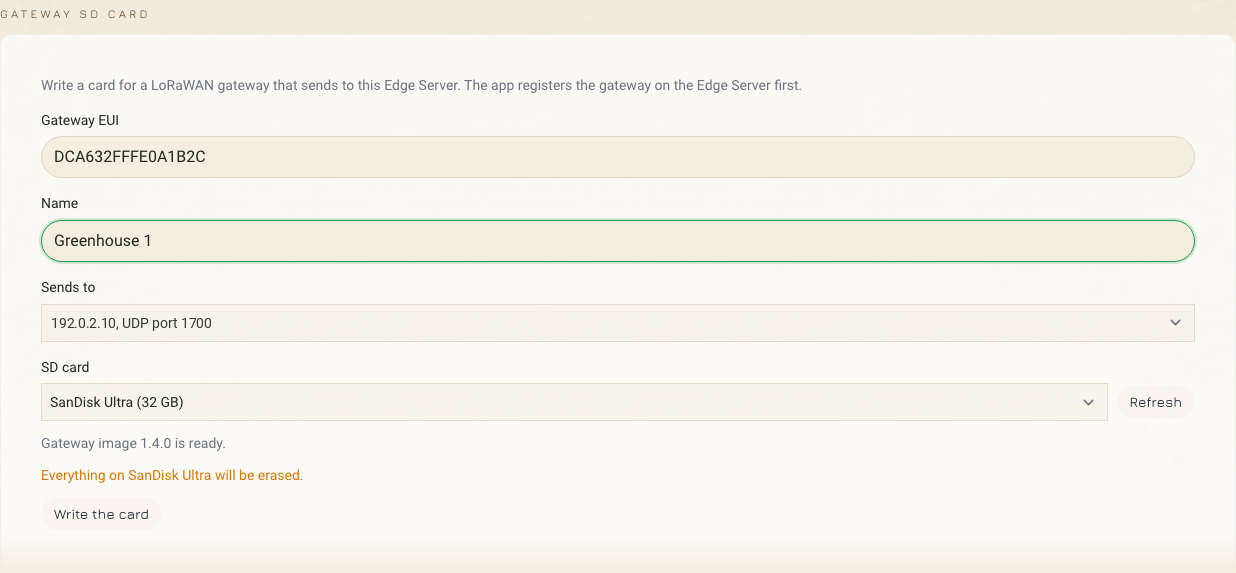
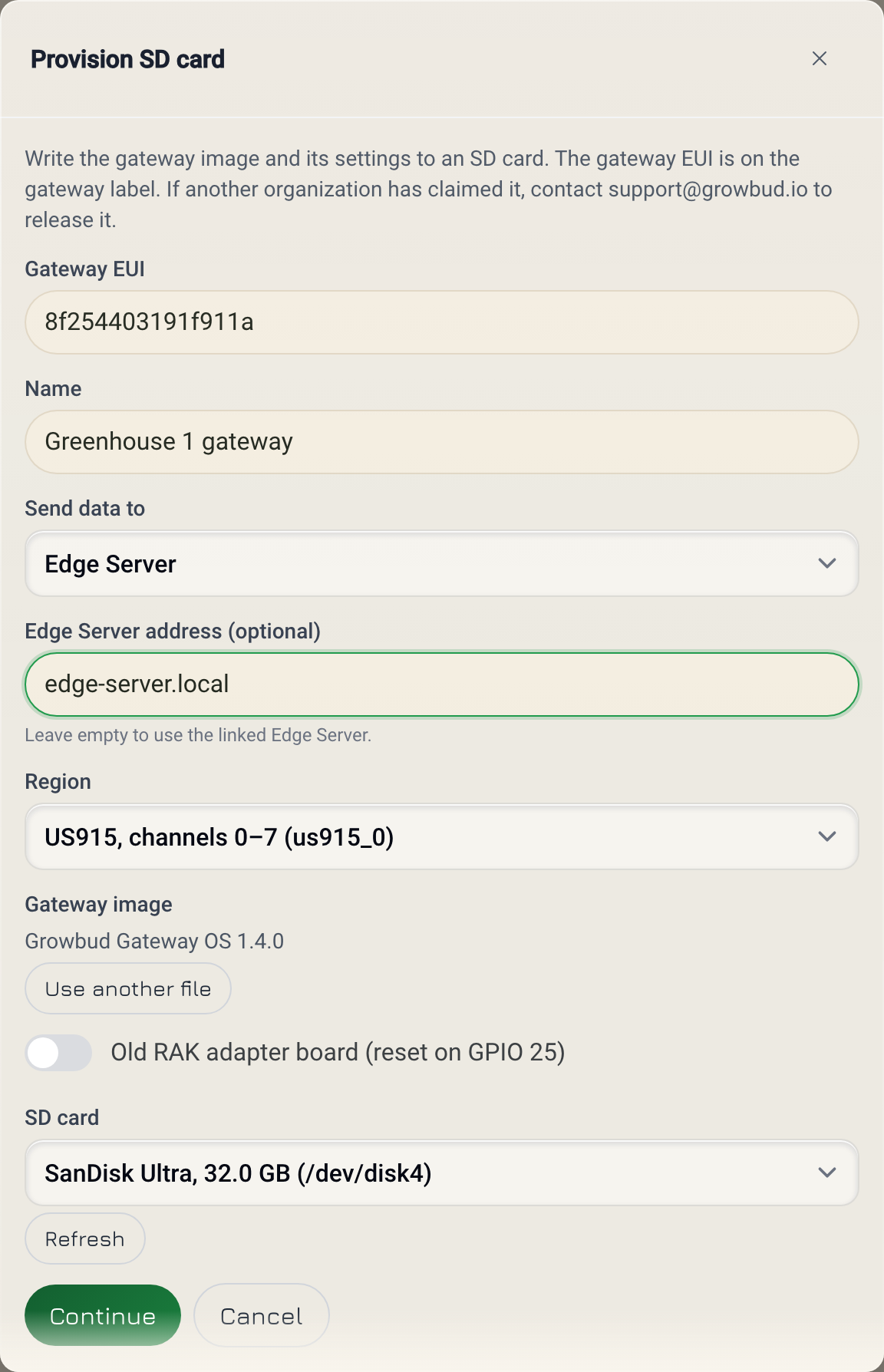
To write the card from Growbud Cloud:
- Open the desktop app and sign in to Growbud Cloud as an organization admin.
- Open Settings, then Edge Server.
- Under LoRaWAN gateways, select Provision SD card.
- Type the Gateway EUI from the gateway label.
- Type a Name for the gateway.
- Set Send data to to Edge Server.
- In Edge Server address (optional), type a host name, for example the
.localname of the Edge Server computer. Or leave the field empty to use the linked Edge Server's address. - Select the Region.
- Insert the SD card, then select it under SD card.
- Select Continue.
- Select Erase and write.
Type the address of your linked Edge Server only. The card always carries the id of the linked Edge Server, and the gateway sends there first.
How the Edge Server announces its id
Layer 1 works only when the Edge Server publishes its id on your network.
- Docker Compose install on Linux. The installer writes
/etc/avahi/services/growbud-edge.service. Avahi, the mDNS service on Linux, publishes the service as_growbud-edge._udpon the LoRaWAN UDP port, withid=<Edge Server id>andv=1in TXT. The installer needssudoand the folder/etc/avahi/services. When it publishes, it showsLoRaWAN gateways find this Edge Server over mDNS as _growbud-edge._udp, id <id>. - Growbud Edge appliance. A timer,
growbud-edge-mdns-publish.timer, publishes the id 2 minutes after boot and then every 5 minutes. - macOS and Windows. The installer does not publish the id. Gateways find these Edge Servers by name or address.
If the Edge Server has no id yet, it publishes nothing. A gateway never follows a wrong id. The installer then shows No Edge Server id yet. Gateways find this Edge Server by address. Run the installer again later to publish the id.
If the installer shows Run the installer with sudo to announce this Edge Server to LoRaWAN gateways over mDNS., run it again with sudo.
mDNS does not cross some network borders. Two examples are separate VLANs (virtual networks on one switch) and Wi-Fi client isolation (a Wi-Fi setting that blocks traffic between devices). There, layers 2 and 3 carry the gateway. Use a name that your router's DNS resolves, or a fallback address.
Keep the address fixed
A card from the desktop app on the Edge Server computer has no id and usually only an IPv4 address. So the gateway cannot follow a new address. Do these steps:
- Open your router's DHCP settings (the settings that give addresses to devices).
- Reserve the Edge Server's current address for the MAC address of the Edge Server computer.
- Write the card with that address.
If the address must change, write the card again with the new address.
A reservation also helps a card with a name or an id. The fallback address stays correct. The gateway does not depend on mDNS alone.
Find which Edge Server a gateway sends to
On each Edge Server
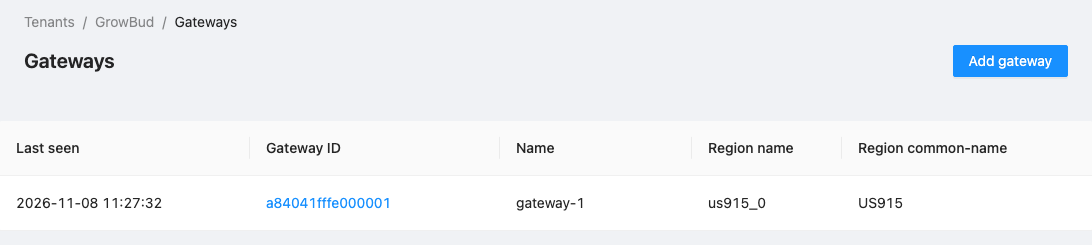
- Open the ChirpStack console of the Edge Server, at your Edge Server address on port 8080.
- Sign in as
admin. The password isCHIRPSTACK_ADMIN_PASSWORD:- Docker Compose install: in the Edge Server's
.envfile. - Growbud Edge appliance: in
/opt/growbud/config/chirpstack-admin.env. Onlyrootcan read this file.
- Docker Compose install: in the Edge Server's
- Open Gateways.
- Find the gateway by its EUI.
- Read Last seen.
The Edge Server that shows a recent Last seen time receives the gateway's packets. An Edge Server accepts packets only from gateways registered on it. The desktop app registers the gateway on the Edge Server. A card from Growbud Cloud reaches the linked Edge Server through the link.
On your network
On a Linux computer on the same network, list the Edge Servers that publish an id:
avahi-browse -rt _growbud-edge._udp
Each result shows the Edge Server's host name, address and id= in TXT. Compare the id with the Edge Server id. On Linux, the Edge Server id is in the id= line of /etc/avahi/services/growbud-edge.service on the Edge Server.
List the Growbud gateways:
avahi-browse -rt _growbud-gw._tcp
Each gateway shows eui=, target= and region= in TXT. target=edge tells you that the gateway sends to an Edge Server. It does not tell you which one. Each gateway also has the host name growbud-gw-<last 6 characters of the EUI>.local.
If something does not work
| What you see | What to do |
|---|---|
| The gateway stops after the Edge Server gets a new address | The card has only an address. Reserve the address in your router, then write the card again. |
| The gateway does not follow the Edge Server by id | Check that the Edge Server publishes _growbud-edge._udp. Run avahi-browse -rt _growbud-edge._udp on the same network. If the list is empty, run the installer again with sudo. |
| Two Edge Servers on one network | Write the card from Growbud Cloud for the linked Edge Server. The card then carries its id. A shared name can resolve to either Edge Server. |
| The card was refused | Read growbud-gateway.rejected.txt on the card's boot partition. Check that udpHost is not an IPv6 address. |
Next
- Flash the indoor gateway SD card: write the card from the desktop app.
- Get the Edge Server: install and upgrade.